Getting started · By Bessos DJ
How to DJ in your browser: your first two-track mix
Start a browser DJ session, load your own tracks, match tempo and make a controlled crossfade in Bessos Flex 4.
Start with the demo tracks
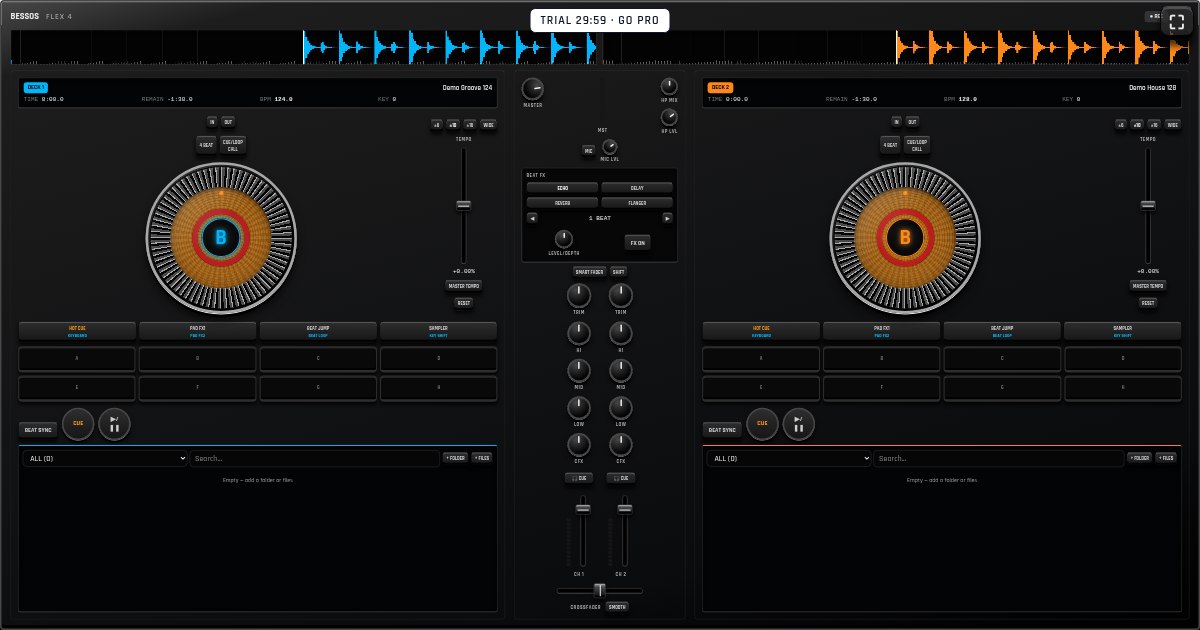
Open Bessos Flex 4 and select START DJ. The console loads two demo grooves, so you can try the controls before choosing your own music. The free trial lasts 30 minutes; it is not unlimited free access. You do not need an account to begin the trial.
Begin at a comfortable speaker volume. Press the play/pause button below the left deck to hear its track. Keep the crossfader toward the left while learning one deck at a time. The crossfader blends the two decks; each channel fader controls that deck’s level.
Load music from your device
Each deck has a song list at the bottom. Use + FILES to choose audio from your device, then select a song in the list to load it on that deck. On a desktop browser that supports folder selection, + FOLDER can add a folder. Decoding support depends on your browser and the file format; try another compatible audio file if one does not open.
Use music you have permission to play and share. The library saves audio on this device, not to a cloud music account. A different browser or device has a separate library, and clearing site storage can remove saved songs. Keep the original files backed up.
Match speed, then listen for timing
BPM describes a track’s tempo in beats per minute. For an easier first mix, choose two tracks with similar tempos and steady drums. Start the incoming track at the beginning of a musical phrase. Use BEAT SYNC or the TEMPO slider to bring their speeds closer together.
Matching BPM alone does not guarantee a clean mix: the beats also need to line up, and musical phrases need to meet at a sensible point. Listen for doubled kicks or a drifting rhythm. Use the jog wheel to adjust the incoming track and try the entry again if necessary. Automatic BPM detection is an estimate, especially for unusual rhythms.
Make a gradual transition
With both tracks running together, move the crossfader slowly toward the incoming deck. Use the LOW controls to avoid stacking two strong basslines at full level. Keep TRIM and channel levels conservative; a louder mix is not necessarily a better mix.
Practice one short transition before adding effects. A four-beat loop can hold a rhythmic section while you prepare the next track. Hot cues let you return to useful moments. Add echo or another effect sparingly once the timing and levels sound right.
Record and review
Select REC in the console’s top row to begin recording and STOP to download the resulting WebM mix. Playback support for that file depends on the player you use. Listen back for sudden volume changes, clashing bass and awkward track entries.
Repeat the same transition with small changes instead of changing everything at once. Browser performance, audio output latency and touch accuracy vary between devices, so rehearse on the device you plan to use. Test recording and playback during the trial before buying a plan.
Try it on your own device
Open the mixer for a free 30-minute trial. No account is needed to start; continued use requires a plan.
Open Bessos Flex 4 →See pricing