Mixer essentials · By Bessos DJ
Online DJ mixer features: what matters for a first mix
Understand virtual decks, EQ, hot cues, loops, effects and local music storage before choosing an online DJ mixer.
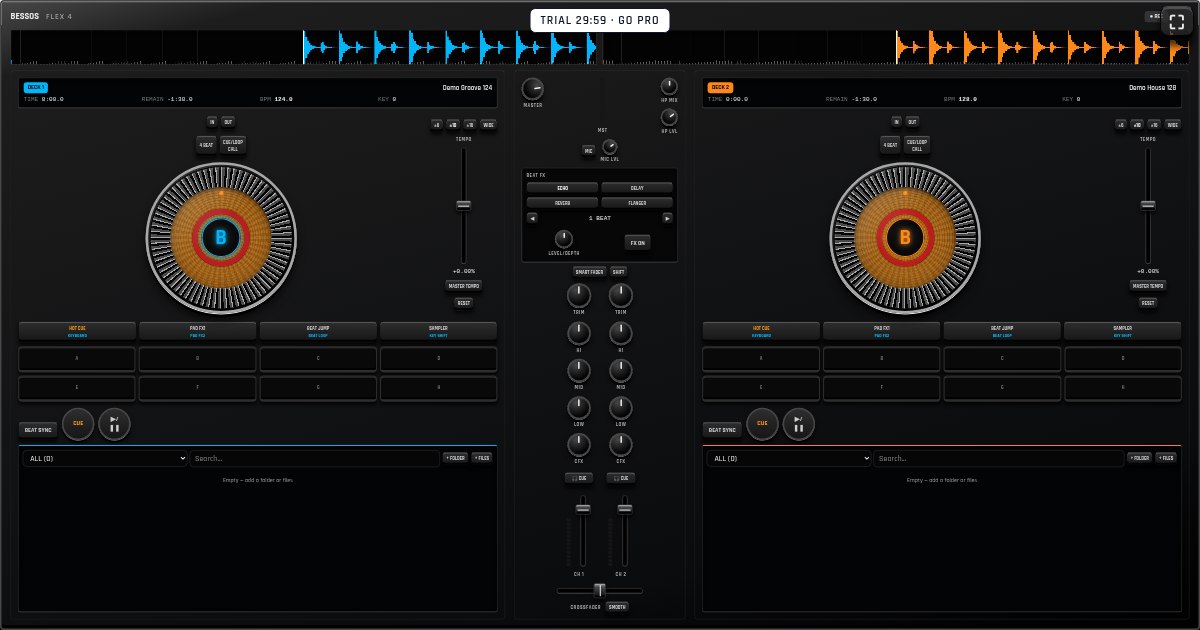
Two decks and a crossfader
An online DJ mixer runs in a web browser. A two-deck layout lets you play one track while preparing another, then blend between them. Bessos Flex 4 brings these controls together in a virtual on-screen controller rather than a physical piece of equipment.
The crossfader changes the balance between decks; channel faders set individual levels. Start with these controls before exploring the rest. A useful practice goal is a transition that keeps the perceived loudness steady without an abrupt gap.
Tempo, jog wheels and EQ
Tempo controls change playback speed. Jog wheels let you make position adjustments and experiment with scratching. Beat sync can help match speeds, but your ears still need to check beat alignment. A waveform is a visual aid, not a replacement for listening.
The HI, MID and LOW knobs shape different frequency ranges. LOW is particularly useful when handing over between two bass-heavy tracks. TRIM sets input gain: if a mix sounds distorted, reduce levels rather than turning everything up. MASTER controls the overall output.
Hot cues, loops and effects
Hot cues mark positions you want to return to, such as the first kick or the beginning of a chorus. Loops repeat a selected passage; a four-beat loop is useful for holding a steady rhythm while preparing a transition.
Bessos Flex 4 includes pad modes, a sampler and beat effects such as echo, delay, reverb and flanger. Try one effect at a low level first. Effects cannot repair poor timing, and too many can obscure the rhythm you are trying to blend.
Local files and device storage
A browser mixer does not have to upload your music to a server. In Bessos Flex 4, imported songs are kept in this browser’s device-local library. That keeps your source audio on the device, but it also means your collection does not automatically follow you to another phone or laptop.
Installed web-app access and offline caching depend on the browser, a prior online visit and retained site storage. Save songs and test reopening the published app offline on your own device before relying on it. Do not treat browser storage as your only backup.
Try the workflow before committing
Use the 30-minute trial to test importing files, touch controls, transitions and recording on your actual device. A mouse, a touchscreen and a small mobile screen feel different even when they show the same console.
After the trial, continued access requires a plan. Compare the workflow you need, not just the number of features on a list. If independent headphone cueing, hardware integration or a particular recording format is essential, verify that requirement directly before choosing any DJ app.
Try it on your own device
Open the mixer for a free 30-minute trial. No account is needed to start; continued use requires a plan.
Open Bessos Flex 4 →See pricing